Your account page is where you keep your details up to date and choose whether to get a venue's marketing emails. To change or cancel a booking, see managing your bookings.
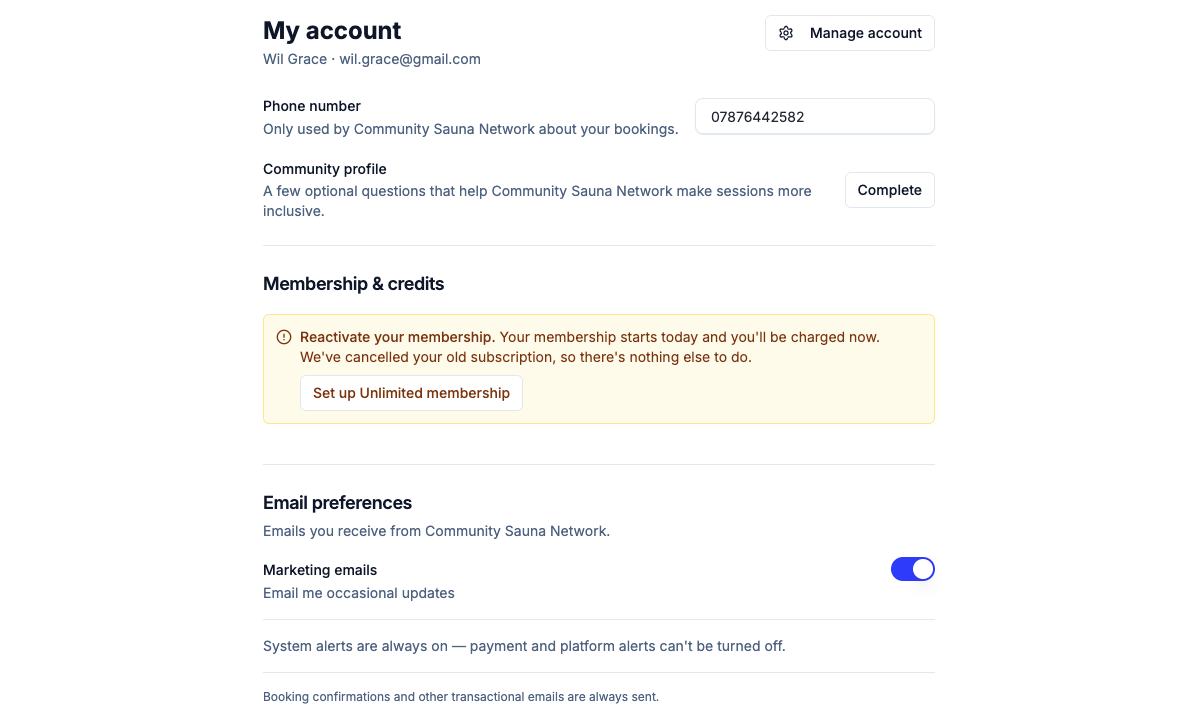
What's on the account page
Sign in on the venue's booking page and open My account from the account menu in the header. You'll see:
- My account: your name, email and a phone number for the venue. Your name, email and password are changed in the secure window behind the Manage account button.
- Email preferences: one toggle for the venue's marketing emails.
- Upcoming bookings, credits and payment history: read-only summaries of your activity with the venue.
Phone number
The venue uses your phone number to contact you about bookings. It's usually optional, and you can update or clear it at any time. If you tick This is an access requirement at checkout, you must give a number before you can book.
At checkout you're asked for a missing number once. If you skip an optional number, you won't be asked again on your next booking, and if a number is already on file you won't see the field.
For venues: choose whether checkout asks for a phone number on Settings → Policies: Off (never shown), Optional (shown once, skippable) or Required (checkout can't finish without one). Access requirements always need a number, even when it's Off. You can edit a customer's details from the customers directory.
Marketing email consent
The Marketing emails toggle under Email preferences records whether you want to hear from the venue beyond your bookings. It's set separately for each venue you book with, every change is logged with a timestamp, and you can turn it off at any time. Venues only ask again at checkout under strict limits, and never after you've opted out.
Booking confirmations, reminders, cancellations and receipts are always sent, whatever the toggle says, because they're about your own booking. See automated emails.
Common questions
-
I opted out but I'm still getting emails. The opt-out only stops marketing emails such as newsletters. Emails about your own bookings are always sent.
-
The Continue button won't work at checkout. Continue names the missing field and jumps you to it, usually a required phone number. If everything looks filled in, retype the phone number by hand: browser or password-manager autofill can look complete without the number reaching the field.
-
Does my preference cover all of a venue's locations? Yes. Consent is recorded per venue, not per location.
-
Where do venue team members set their own alerts? On this same account page, admins and staff get extra notification toggles. See team notifications.