Give a session more than one length, such as 45 and 75 minutes, and customers choose how long they stay when they book. Start times can overlap - a start every 30 minutes on a 60-minute session - and every start shares the session's spaces, so the sauna is never booked past its capacity.
If you don't see Prices & lengths on a session, get in touch and we'll turn lengths on for you.
How spaces are shared
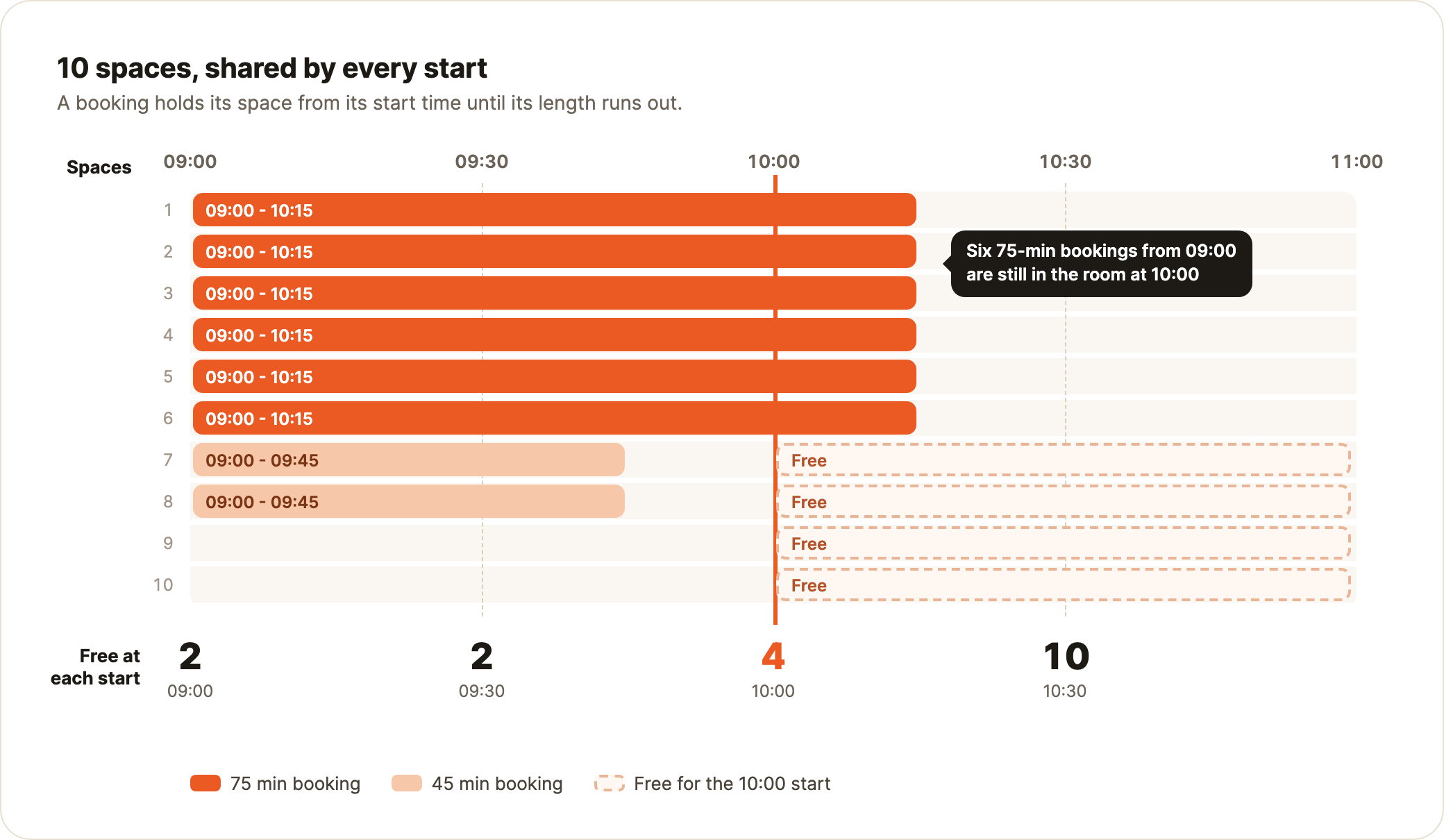
Every start of the session draws on one number: the session's Spaces. A booking holds a space from its start time until its length runs out, so a 75-minute booking from 09:00 is still in the room at 10:00.
So on 10 spaces, six 75-minute bookings at 09:00 leave four free at 10:00.
Add lengths and prices
- 1Open a session on the Sessions page and go to Prices & offers.
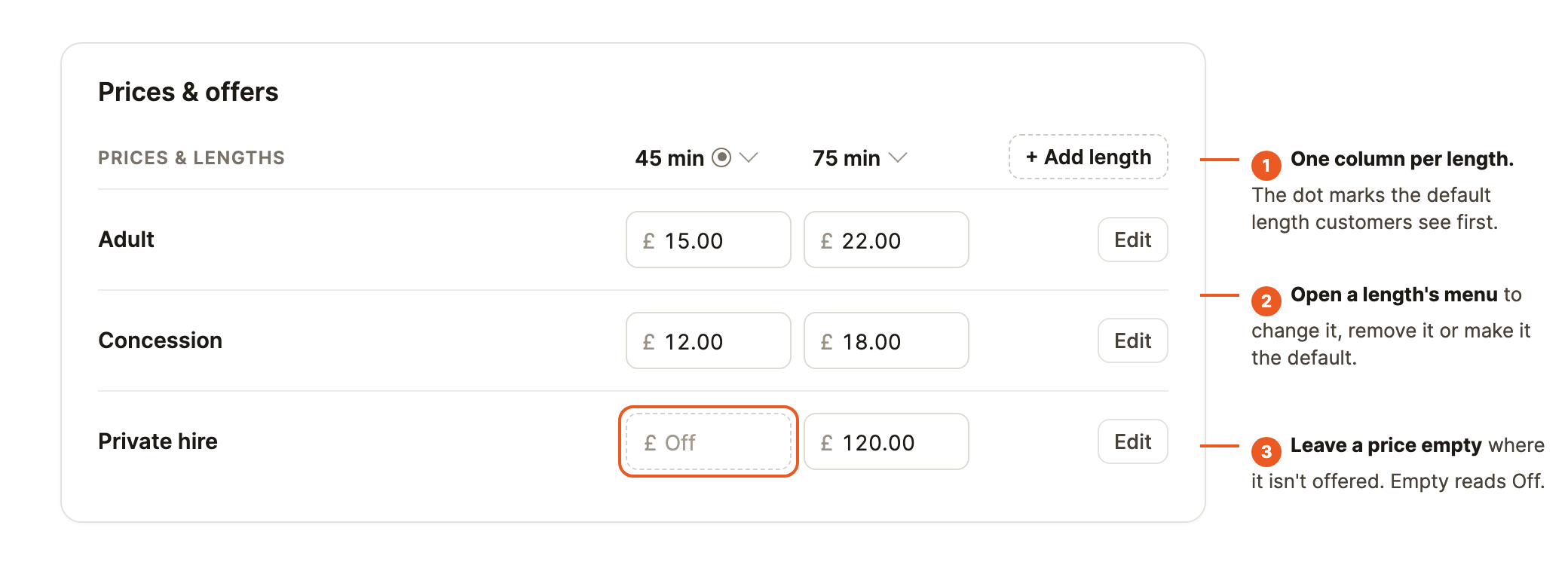
- 2Under Prices & lengths, select Add length, enter the minutes and select Add. A session can have up to 4 lengths, from 15 minutes to 4 hours in 5-minute steps.
- 3Enter a price for each ticket type at each length.
- 4To pick which length customers see first, open the length's menu and select Make default. "From" prices use the cheapest length. Change length and Remove are in the same menu.
Add price sets a price's amount at every length at once. Leave a price empty at a length it isn't offered at - no 30-minute private hire, say. Empty reads Off.
Add start times
Add times on the repeat schedule or as one-off dates as usual.
Times by example. Type a time after the day's last start and the editor suggests "a new start every 30 min" - select Fill in and set the Last start. Or select Add a range. One-off dates work the same way.
Starts at a steady step show as one chip, like "09:00 → 12:00 every 30m · until 13:15". Select it to change or remove them.
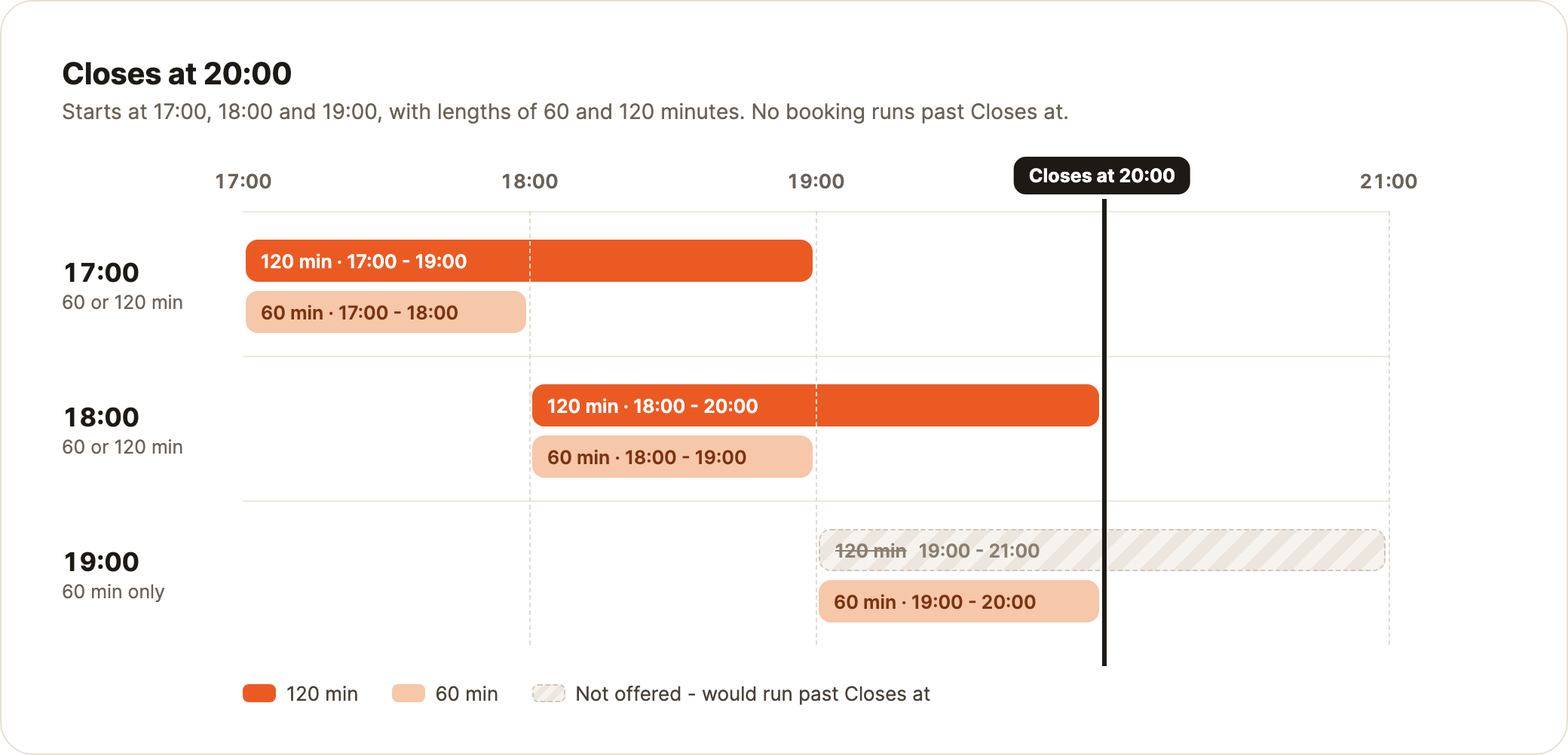
Closes at. With two or more lengths, set Closes at on a range of times and no booking runs past it: starts at 17:00, 18:00 and 19:00 closing at 20:00 offer 120 minutes until 18:00, then 60 minutes only. A range can be just two starts: 14:15 and 15:00 every 45 minutes, closing at 15:45, offers 45 or 90 minutes at 14:15 and 45 at 15:00.
Overlapping starts share spaces, and bookings already made keep their length.
Choose start times and lengths
Overlaps never oversell, but they can leave gaps too short to sell.
- Start every shortest length, and make each length a multiple of it: 30 and 60 minutes, starting every 30. Any gap then sells as 30 minutes.
- Keep sell-out times fixed. Offer lengths at quieter times.
- Set Closes at to your current finish, so nothing runs into the next session.
- Need the room empty between groups? There's no separate cleaning block - space the starts by your longest length plus the gap. With 50 and 70 minutes and 20 minutes to clean, start every 90 minutes: 10:00, 11:30, 13:00. Nothing can be booked between starts.
What customers see
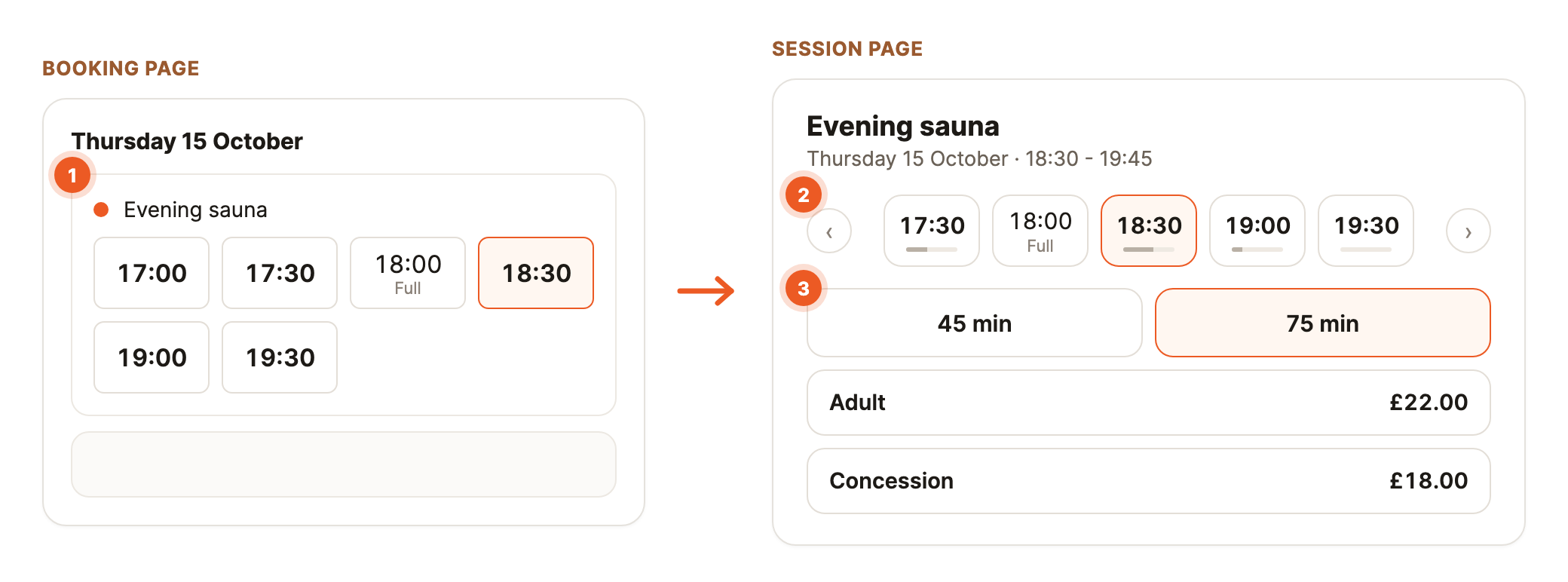
- Booking page: starts that overlap show as one item - headed by the session name and its lengths (such as "Morning sessions · 60 or 120 min"), or by its times and lengths (such as "18:00 - 21:00 · 30 or 90 min") if your booking page hides session names - with a button for each start time. A full start still opens, so customers can join its waiting list.
- Session page: customers pick a length, then a price at that length. Start times without room for their group are greyed.
- Emails show the booking's own times, such as 09:00 - 10:15.
See who's booked
On Sessions and Bookings, a day's overlapping starts are one block, such as "09:00 - 12:00, every 30 min". Select it to see bookings grouped by start, each with its length; starts with no bookings show as a row of times - select one to add a booking, edit it or hide it. Each start can be hidden on its own, or select Hide all starts from the block's menu (on Sessions, in the start's panel). A calendar link shows them the same way, as one block per stretch of booked time.
Cancel a day's starts
Open a start from the calendar and use Cancel session, as for any cancelled session. Choose Every start on this day to cancel them all. Bookings are refunded as usual.
Common questions
-
What happens on the waiting list when someone cancels? Their space frees time on every start it overlapped, so each of those starts offers the space to its waiting list.
-
Can I set a different price for one date? Not on a session with lengths. Prices are set once per length, for every start.
-
Do member rates follow the length? Yes - a percentage comes off that length's price, and a fixed member price never exceeds it. Each booking uses one free session.
-
Can a membership's free sessions cover only some lengths? Yes. On the membership, set Covers under Free sessions to Only these lengths - for a 30-minute tier beside hourly ones. Bookings at other lengths pay as normal, or the member rate. See free sessions for some lengths only.
-
Can I remove a length, or go back to one? Not while future bookings hold it - move or cancel them first. With one length left, its menu has Turn off lengths: a normal session, which can run over 4 hours.
-
Can a booking move to another time? Yes. It keeps its length and price, and only times with room for that length are offered. To change length, cancel and rebook.
Troubleshooting
-
A start shows as full but it isn't busy. Bookings from an earlier start may still be in the room. Open that start to see who's booked.
-
The price at checkout isn't what I expected. Check that ticket type's price at the chosen length under Prices & lengths.