Customers who lose their confirmation email can email themselves a fresh set of manage links - so you spend less time digging out bookings on their behalf.
Plenty of customers check out as guests, without ever creating an account. When one of them loses the confirmation email, "Find my booking" lets them get their links back on their own. It's the same self-service trail covered in customers managing bookings, focused on the recovery step.
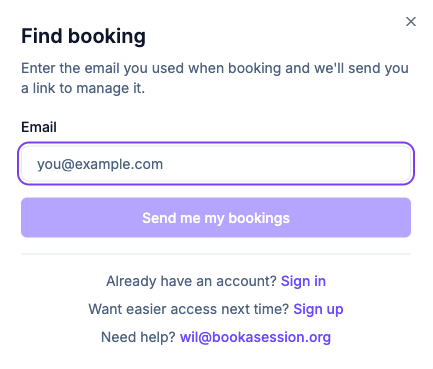
How customers find it
Customers can reach the lookup form three ways, and all of them land on the same email-entry form.
- Find booking in the header of your booking page.
- find an existing booking on the sign-in screen, for customers who tried to sign in first.
- A direct link at
bookasession.org/your-name/find-my-booking, handy to paste into a reply when someone emails asking where their booking went.
What happens when they look it up
- 1The customer enters the email address they booked with.
- 2We email that address a list of their upcoming bookings, each with a Manage booking link.
- 3The customer opens any link to reschedule, change spaces, or cancel - no account or password needed.
Each link is a per-booking key, so the customer who receives the email can manage that booking even though they never made an account. It's the same link that sits in their original confirmation email.
Only upcoming, confirmed bookings are included. Cancelled bookings and sessions that have already finished are left out, and the list is capped at 20 bookings.
Why it never confirms an email
The lookup always shows the same "check your inbox" message, whether or not the email matched a booking. That's deliberate - it means no one can use the form to discover whether a particular person has booked with you. If the email doesn't match, no email is sent and nothing is revealed.
Because the response is identical either way, the form is safe to link publicly. Point any "I can't find my booking" message straight at it instead of looking the booking up yourself.
When a customer says they didn't get the email
Most "no email" reports come down to one of these:
- Wrong address. Only the exact email on the booking matches. Ask which address they used, then try that one.
- No upcoming bookings. If every booking has already happened or been cancelled, there's nothing to send. You can still see past bookings on the bookings page.
- Spam folder. The email shows your venue name as the sender - ask them to check spam and search for your venue name.
- Asked again too soon. To prevent abuse, the same email can only be looked up once a minute, and a few times an hour. If they spammed the button, ask them to wait a minute and try once.
If they still can't get in, you can always reschedule or cancel for them from the bookings page.
Common questions
-
Do customers need an account to use this? No. The whole point is to recover bookings for guests who checked out without one. The links work without signing in.
-
What if a customer re-sends to themselves after making a new booking? Repeat submissions within the same hour are deduplicated so customers don't get a pile of identical emails, but a genuine resend that now includes a new booking still comes through.
-
Can a customer manage a private hire booking this way? Whole-session private bookings are managed by you, so customers are pointed to contact the venue for those. See private sessions.
-
Is there a setting to turn this on? No - it's always available on every booking page. What customers can actually change once they open a booking is governed by your cancellation and reschedule policy.