Sign in with the email address you joined or bought with, and your membership and bundle credits are applied for you when you book. Gift card balances and discount codes are entered at checkout. To change or cancel a booking, see managing your bookings.
Check your membership and credits
Sign in on the venue's booking page and open My account from the account menu in the header. Your booked sessions are under Upcoming bookings, and everything you can spend is under Membership & credits.
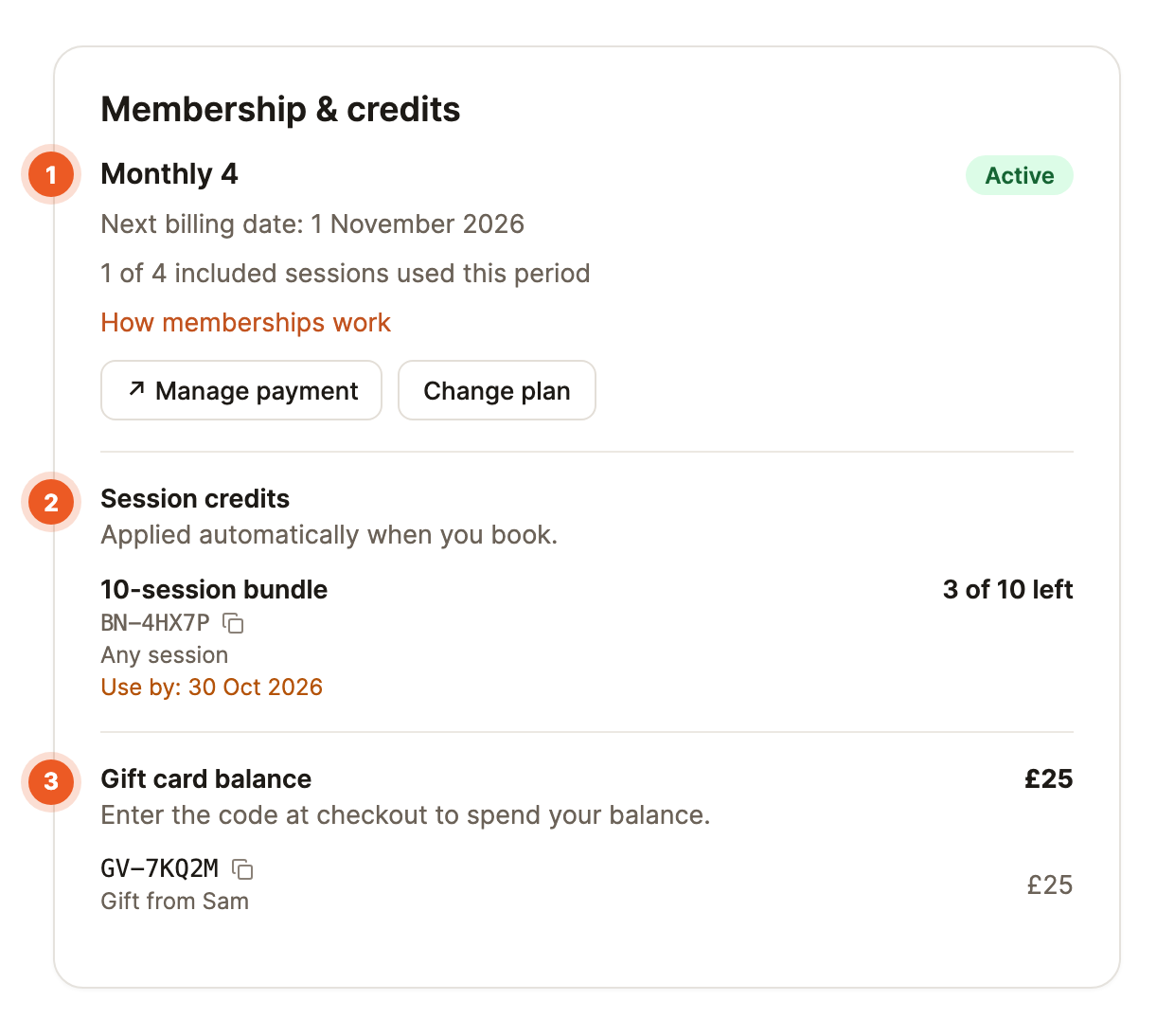
- Your membership: its name, an Active badge, your next billing date and how many free sessions you've used, for example "1 of 4 included sessions used this period". Manage payment updates your card or cancels, and Change plan moves you to another membership.
- Session credits: each bundle with its code, how many sessions are left and its Use by date. The date turns amber when it's less than 30 days away.
- Gift card balance: money-value gift cards and their codes.
Loyalty rewards appear here too, each with a Book your free session button.
What you see at checkout
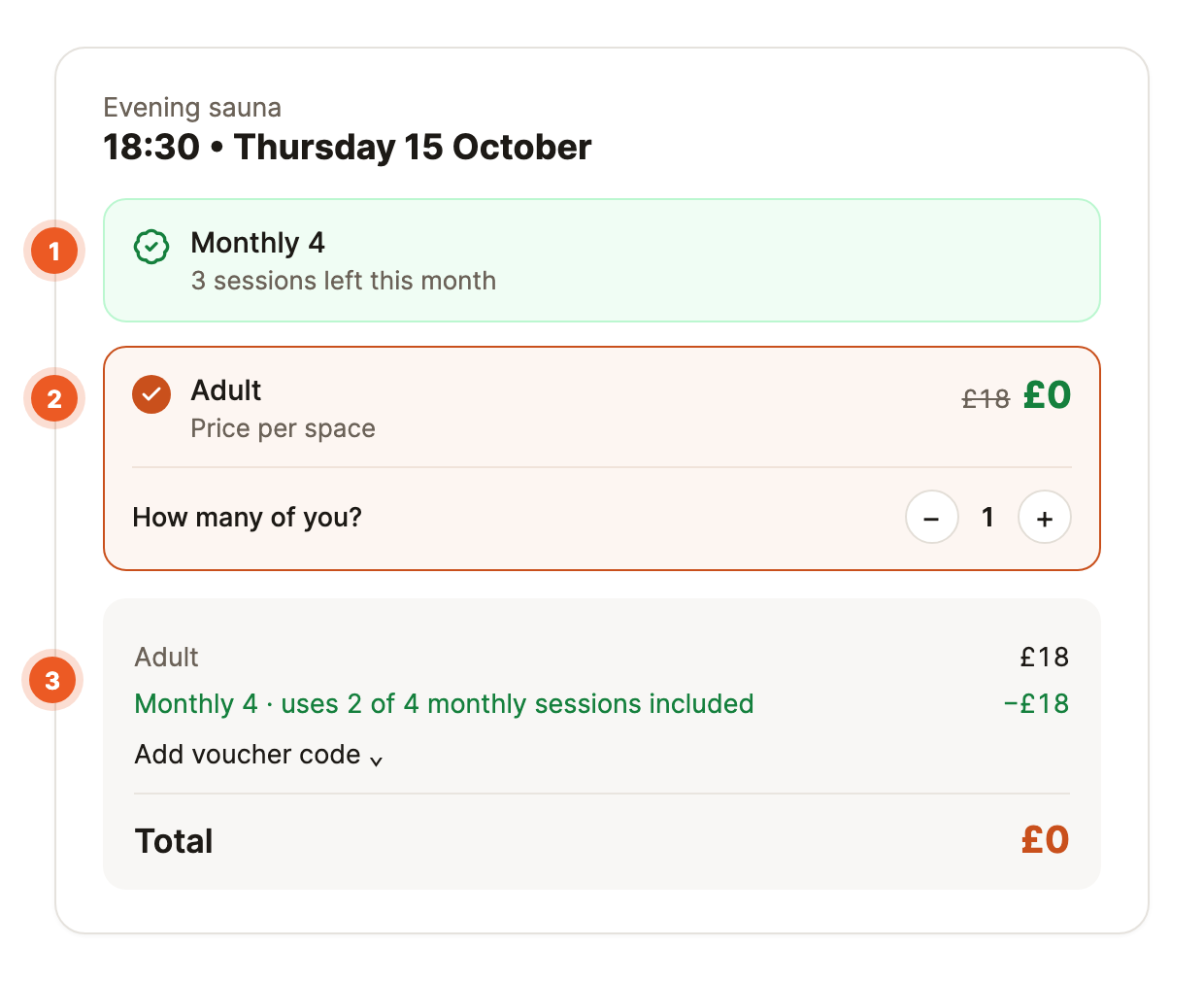
- 1Sign in before you choose a session, using the email address on your membership or bundle.
- 2Pick your session. A green card at the top shows your membership and how many free sessions you have left.
- 3Choose your ticket. A free session or bundle credit shows as £0 with the usual price crossed out. A member rate shows your price with the usual price crossed out.
- 4Check the summary. It names what was used, for example "uses 2 of 4 monthly sessions included", before you confirm.
Free sessions
Free sessions are used automatically. One covers your own space, and any extra spaces on the same booking are charged as usual, unless your membership says it covers more. Once you've used them all, the card says Included sessions used for the period and you pay your member rate, or the usual price if your membership doesn't have one.
Bundle credits
When you're signed in, the green credit card shows your bundle and how many sessions are left, and a credit is used automatically. If you also have free sessions left on a membership, the free session is used first and your credit is kept. To keep a credit for later, tap Pay instead, and Use credit to switch back. If you're signed out or using a different email, tap Add voucher code and enter the bundle's code instead.
Gift vouchers and discount codes
Tap Add voucher code, enter the code and tap Apply. A session voucher covers the session, and a money gift card takes off up to its balance, with anything left staying on the code for next time. Codes don't cover add-ons such as towel hire.
Common questions
-
Do unused free sessions roll over? Only if the venue has switched that on. Tap How memberships work on your account page to see the venue's rules.
-
Can I book next month's free sessions now? It depends on how the venue's memberships reset. If they reset each week or calendar month, a session counts against the week or month it's in, so you can book next month's free sessions now, as far ahead as the venue allows. If they reset on your payment date, a session counts against the period you're in when you book, so next period's free sessions open up after your next payment.
-
My bundle isn't showing. You're probably signed in with a different email from the one you bought it with. Sign in with that address, or enter the bundle's code at checkout.
-
What happens if I cancel? A free session, bundle credit or voucher is always given back, and a free session returns to the period the booking was in. Whether you get money back depends on the venue's cancellation policy.
-
Can I use a bundle and a voucher code on one booking? No, one credit or code per booking. To type a code while a credit is applied, tap Pay instead first. A code does work alongside a member rate.
-
Why don't my free sessions show for some sessions? Some memberships only cover certain sessions, times or session lengths. A note at the top of the session page tells you when your membership doesn't apply, and you can still book at the usual price.